If you are not getting an internet connection please complete the following steps to troubleshoot the issue.
Step 1: Identify and locate your equipment
Locate your internet equipment and identify the gateway/router. Verify where cables connect between devices. Note the location of all equipment for future troubleshooting.
Step 2: Reboot your gateway
Remove the power cable from the back of the gateway/extender. Confirm all of the lights are off on the gateway/extender. Wait 10 seconds. Plug the power cord back into the gateway/extender. Give the system 1-2 minutes to to return to normal operation.
Step 3: Reboot your ONT
- Identify and locate the Optical Network Terminal (ONT) in your home or installation area.
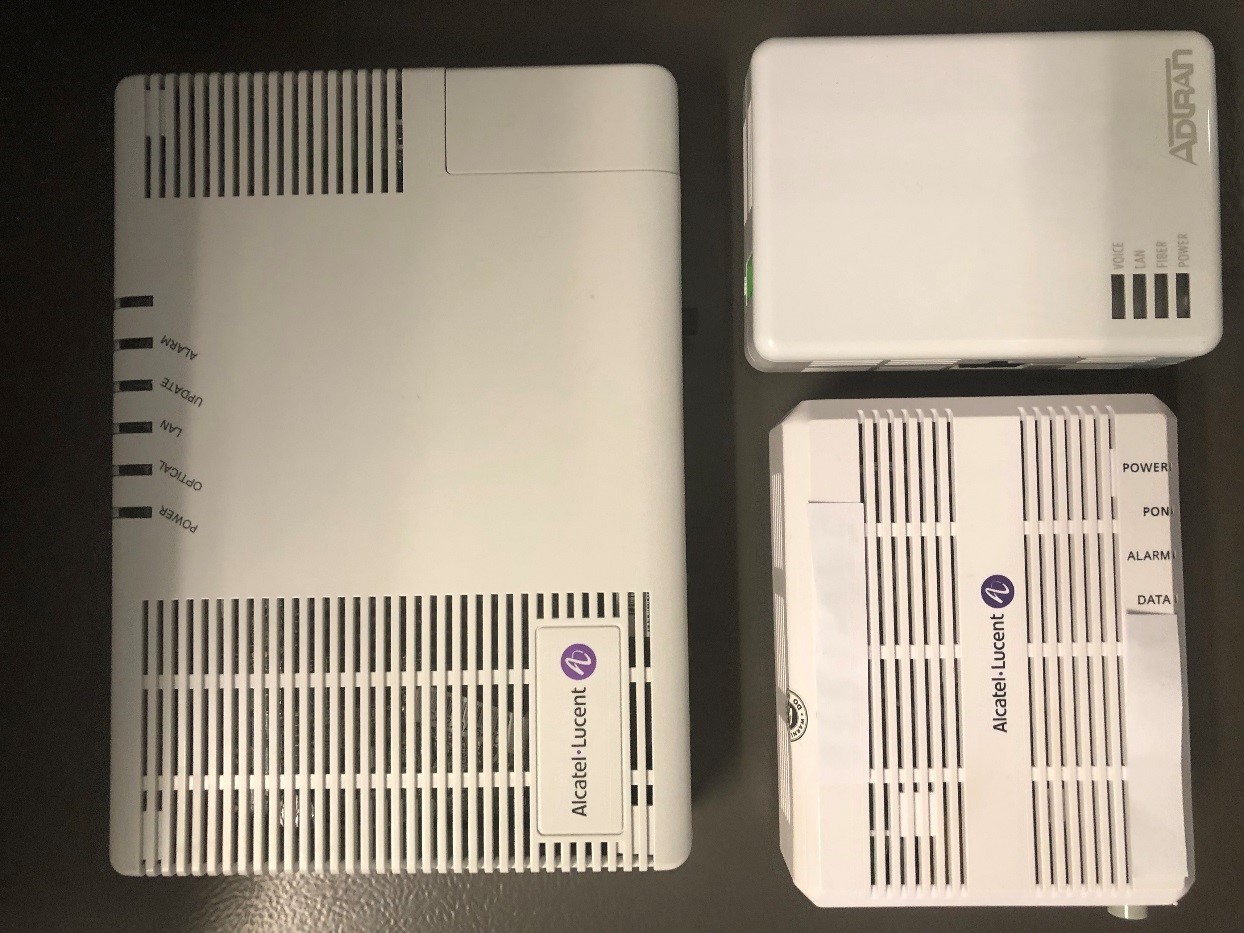
- Check for the main power cord that goes into the ONT and the end that goes into the power outlet to make sure it is not loose or disconnected.
- Now it's time to perform the reboot on the ONT. Find the main power cord going into the ONT and unplug the cord. You may need to push the clip to release it. Unplug the cord and wait for 10 seconds before plugging it back in.
- Confirm power and status lights return to their normal state. If for some reason the power does not return, ensure the power button on the ONT is powered on.
- Wait at least 3 minutes before reconnecting devices and test internet connectivity to verify the issue is resolved.



 How do I reboot my wireless gateway?
 How do I reboot my wireless gateway?